👋 Hi, it’s Torsten. Every week or two, I share actionable advice to help you grow your career and business, based on operating experience at companies like Uber, Meta and Rippling.
If you enjoyed the post, consider sharing it with a friend or colleague 📩; it would mean a lot to me. If you didn’t like it, feel free to send me hate mail.
The release of ChatGPT Deep Research was a huge “aha moment” for me. As a non-engineer, it was the first time that AI automated something end-to-end that was core to my job and that I was good at.
Instead of spending hours doing manual Google searches and compiling the results, I could now get a 20-page report in minutes. Mind-blowing.
But as always with AI, once I got over the initial excitement, I realized that the results were often pretty rough around the edges. Questionable sources, shaky methodology, barely formatted walls-of-text — you name it, I’ve seen it in a Deep Research report.
The potential was clearly there, but it didn’t seem like the promise of a “McKinsey analyst on demand” was entirely accurate. At least not without putting in the work to understand and address the weaknesses of the tool.
As I was going through this learning process, I was looking for guides online. But I was surprised to find that most of them were way too generic to be actionable.
So I decided to write the ultimate guide to AI research agents myself.
No hype — just my hard-earned lessons on what works, what doesn’t, and how to get the best possible output. Including actual side-by-side examples so you can see the impact of the best practices I’m proposing.
We’ll cover:
-
How I think about the core use cases as well as limitations of DeepResearch
-
Which AI research tool is best for what task (incl. cheaper alternatives to the $200 ChatGPT Pro plan)
-
How to write effective prompts that give top-tier output every time
-
How to get the most value out of the final report
And if you’ve been following the Operator’s Handbook for a while, you know it’ll be detailed. So grab a coffee and let’s dive in ☕.
P.S. This is the first part in a new series about how to get actual work done with AI; in the same in-depth, tactical style as other Operator’s Handbook posts. If you have topics you’d like me to write about, let me know.
AI research agents are incredibly useful — regardless of your job. “Research” might sound like something that’s mostly relevant in academia or certain entry-level roles; but once you look closely, I bet you’ll find that you spend a lot of time on this.
For example:
-
As a Product Manager, you’re researching competitors’ products
-
As a Founder, you’re learning about sales tax, payroll, or cap table math
-
And if you’re in BizOps, your entire job is basically to ramp up ASAP on a new topic every week so you can make an impact and move on to the next thing
AI research agents can help with all of that and more. And they’re not just useful on the job.
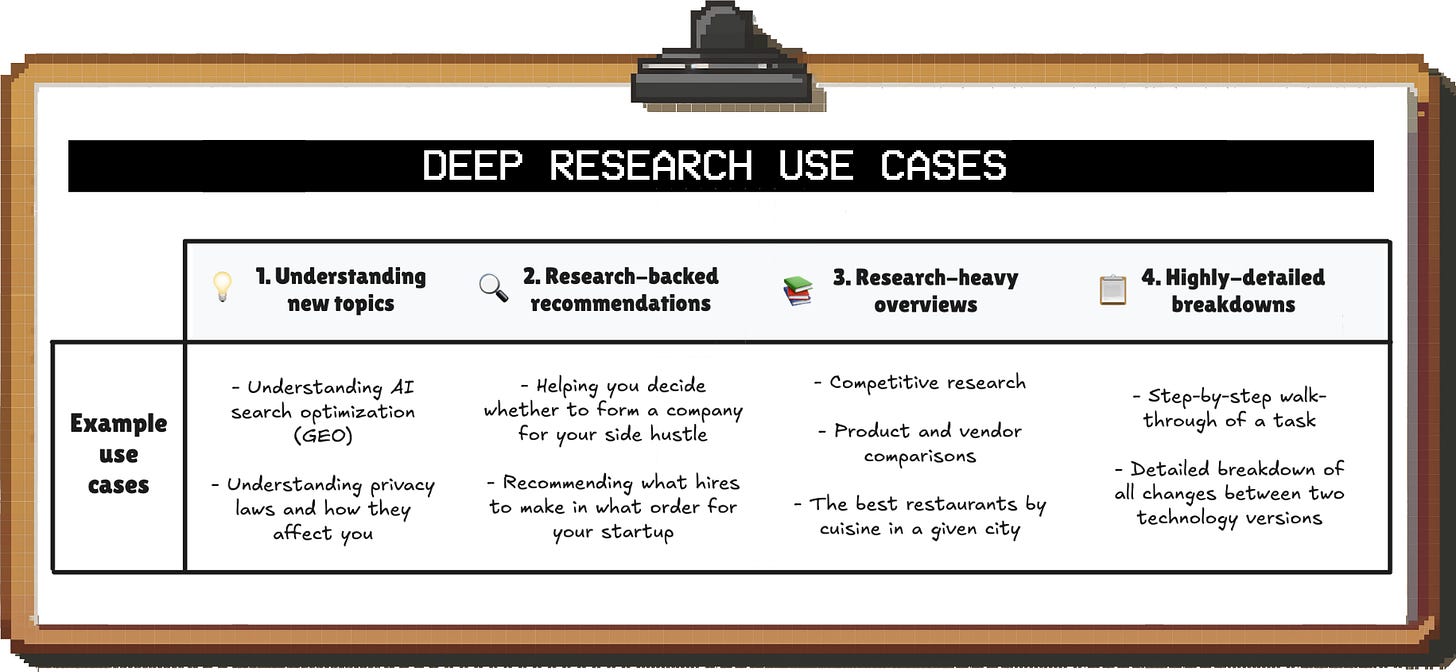
Based on my experience, the high-level use cases are:

AI can reduce the time required to do these things by 80% – 90%. But: Do not completely outsource these tasks without oversight. If you blindly use the output for anything important, you’re guaranteed to have a bad time.
These AI agents, at least in their current versions, need serious handholding to produce something robust. And to play the role of the critical “manager”, you need to know what to watch out for.
Here are the five biggest issues to be aware of:
As you’ll see in the detailed comparison below, most AI research tools don’t proactively ask for context and only use the information you provide in the prompt.
Like an overeager analyst, they jump straight into execution, even if they have no idea what you’re actually trying to do with the report.
And even if the agents do ask for context (e.g. because you told them to):
-
The questions don’t always cover all important aspects, and
-
They never follow up if your answers are insufficient
👉 What to do about this: Proactively provide as much context as possible about your situation and what you’re trying to achieve, and tell the agent to ask for anything that’s still missing
I’ve observed a few major issues with how AI agents deal with sources by default (i.e. unless you tell them how to do better):
-
☝ Over-reliance on individual sources, resulting in biased assessments or tunnel vision
-
🧩 Mixing and matching data sources without highlighting caveats, creating a patchwork analysis that doesn’t make sense
-
🗑️ Use of low-quality sources (e.g. random Reddit posts from anonymous users)
-
📆 Outdated sources (e.g. data from 5 – 10 years ago even in areas where things are changing fast)
If you don’t watch out, you’ll end up with a fancy-looking report on a shaky foundation:

👉 What to do about this: Especially for data-heavy reports, you have to 1) provide guidance on what sources to prioritize and 2) request visibility into how sources were used.
Deep Research cannot access paid sources. However, depending on your area of research, that’s where a lot of the good data sits.
For example, for a lot of analyses in B2B SaaS, you might want to leverage data from LinkedIn’s API or market research firms. Right now, to do this, you’ll need to first download those datasets and then make them accessible to the AI.
In addition, AI agents can obviously only research what’s available online. If you’re looking into a nuanced, niche topic (e.g. a complicated legal matter), that’s a problem.
👉 What to do about this: In these cases, it’s best to treat Deep Research as a tool that can help you prepare for expert calls (so you know what questions to ask) rather than an end-to-end solution to give you a recommendation.
The quality of reasoning in DeepResearch reports varies a lot; both between different queries as well as different tools (e.g. ChatGPT vs. Gemini). Sometimes I’m deeply impressed, and other times I feel like I’m reviewing the work of a high school intern.
In addition, you’ll find that the research agents often just rehash an opinion they found (e.g. in a blog post) instead of really thinking through an issue. In other words, you’re outsourcing judgment to a random person online.

👉 What to do about this:
-
Most importantly, pick the most capable tool (more on that below)
-
Make sure you review the research plan in advance and provide detailed instructions re: methodology
-
Give critical feedback on the first draft to address any glaring issues (even if it makes mistakes, AI always has a good attitude and is happy to fix things)
By default, the research reports you get from ChatGPT and Gemini are massive walls-of-text that are difficult to make sense of.
Sure, you can get an AI summary; but in some cases, you do want to go deep. You just want information presented in a way that makes it easy to digest.
👉 What to do about this: Give instructions on how you want the report to be structured and formatted (e.g. adding a “TL;DR”, using overview tables etc.).
Alright, enough complaining; let’s talk about specific things you can do to get the most out of these tools.
-
First, we’ll dig deeper into the different tools and their strengths and weaknesses so you know which one is the best fit for your use case
-
Then, we’ll go through actionable best practices you can use to get high-quality outputs every single time
You’ve probably heard of ChatGPT Deep Research, but it isn’t the only tool out there. Tons of other players released their own versions in the last few months.
The big ones are:
At first glance, they’re pretty similar. You drop a research prompt into a chat window, and 5 to 30 minutes later you get a detailed multi-page report.
However, the devil is in the details. I’ve tested these tools extensively over dozens of use cases, and there are massive differences in how they approach research and the quality of the outputs:

Note: I’m comparing the basic version of the models here so you know what you’ll get as a free user. I’ll cover the performance differences of the premium “advanced” models in a separate section at the end.
TL;DR:
-
ChatGPT Deep Research is still overall the best tool for truly deep research out there; no other tool comes close to the depth and rigor at the moment
-
Perplexity is great for brief, well-structured overviews on new topics
ChatGPT’s two biggest weaknesses are 1) how it selects sources and 2) that it creates massive walls-of-text with poor formatting.
Both of these are default behavior, though, that can be adjusted with the right prompts; we’ll get into that in the next section. In my experience, it boils down to this:
You can ask ChatGPT to use different sources or make the report pretty, but you can’t really prompt the other tools to be much more rigorous.
However, the $200 Pro tier is ridiculously expensive for individuals, and the free and Plus tiers have low usage limits. As a result, you might want to choose another tool as your “daily driver” based on the pros and cons discussed here and “save” ChatGPT Deep Research for your most important tasks.

If you already have a favorite, feel free to skip ahead to the prompting best practices.
🏆 Winner: Grok; 🥈 Runner-up: Perplexity

Grok and Perplexity both have generous free tiers with multiple queries per day, making them the clear favorite for anyone trying to get Deep Research without a subscription.
In contrast, the free tiers of ChatGPT and Gemini have fairly restrictive limits per month, and Claude doesn’t have Research in the free tier at all.

As a heavy user, you’ll eventually face the question of whether you should upgrade to a premium tier. In addition to much higher usage limits, you supposedly also get access to better models and higher-quality outputs.
We’ll discuss towards the end of this section whether that makes a noticeable difference or not (spoiler: not really).
🏆 Winner: Gemini; 🥈 Runner-up: ChatGPT

Especially if you don’t write a lengthy prompt with detailed instructions on how you want the agent to conduct the research, it’s key to understand what it plans to do before it starts.
For example, if you’re asking for a comparison of software tools, you might want to understand what criteria it plans to use to evaluate them so you don’t have to wait 5 – 10 minutes to get something that misses the mark.
Gemini is the only tool that shares its research plan by default. Among the others, ChatGPT, Claude and Perplexity usually provide one on request:

Grok, on the other hand, tends to ignore my requests and just proceeds with the research 🤷.
Note: To maximize the odds that the agent shares the research plan, ask for it both 1) in the initial prompt as well as 2) when answering follow-up questions.
🏆 Winner: ChatGPT; 🥈 Runner-up: Claude

ChatGPT Deep Research is the only tool that reliably asks 3 – 5 questions for context, even when you don’t tell it explicitly to do that. Plus, the questions are usually on point (i.e. similar to what a strong analyst would ask).
The others do it when you ask them to in the prompt, although not reliably. Here are two things that have worked well for me:
-
With Gemini, repeat your request to ask for missing context after the agent shares the research plan
-
With Grok, include a request in your prompt to explain how [XYZ] applies to [my situation / my company]. It’ll then sometimes realize it needs additional information to do that
🏆 Winner: ChatGPT; 🥈 Runner-up: Perplexity

Reasoning and judgment are the foundation of a good research report.
If you don’t agree with the methodology the agent used or the conclusions it arrived at, it doesn’t matter how long or pretty the report is.
ChatGPT is the clear winner here; not only does it show strong judgment (e.g. when choosing evaluation criteria or deriving takeaways), it also gives strong recommendations with clear reasoning for how it arrived at that opinion.
All of the other tools (except Perplexity) regularly make questionable choices in their research approach, and it’s often unclear how they arrived at their recommendations. As a result, you have to read the reports very carefully and ask follow-up questions if you plan on using the output for anything important.
🏆 Winner: ChatGPT; 🥈 Runner-up: Gemini
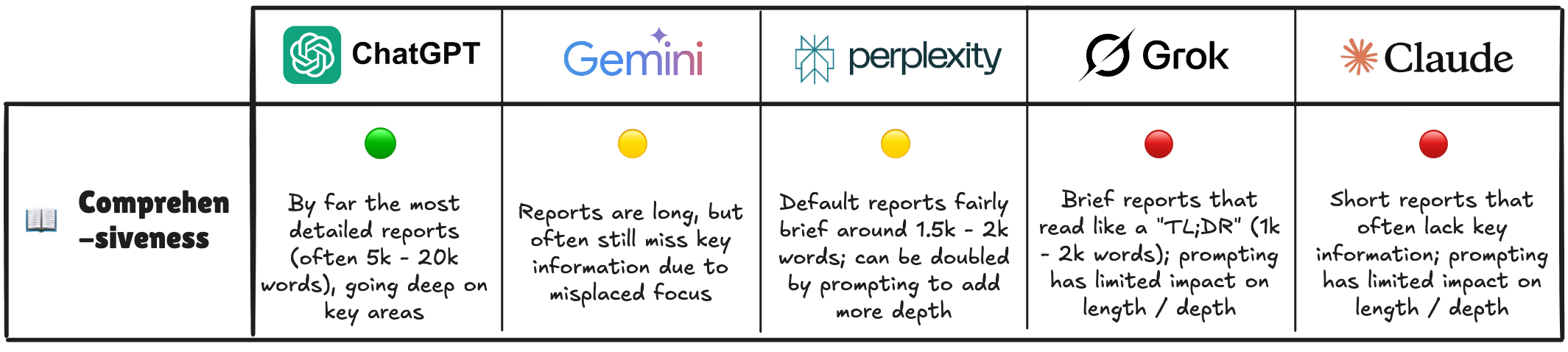
ChatGPT and Gemini produce by far the most comprehensive reports; however, while ChatGPT typically goes deep on the important areas, Gemini often adds generic “fluff” that wasn’t requested in the prompt.
The obvious upside of ChatGPT’s massive reports is that you get much more detailed considerations for complex topics than with the other tools.
But it also means that you need to add instructions to improve the report structure and formatting (e.g. by adding summaries for each section), and/or get an AI summary for these reports if you need insights quickly. We’ll dig more into that below.
The other three tools suffer from the opposite problem; their reports aren’t really deep research. Even if they consider dozens (or in the case of Claude, hundreds) of sources, the output reads like a “TL;DR”, so don’t expect a lot of nuance, detailed comparisons or super tactical guides.
You can get somewhat more detailed reports by asking them to be “extra thorough” and “aim for at least [X thousand] words” (esp. from Perplexity), but it won’t reach ChatGPT levels.
🏆 Winner: Perplexity; 🥈 Runner-up: Grok

Perplexity and Grok both produce easy-to-read reports by default that make good use of bulleted lists and overview tables. If you’re looking for quick, well-formatted insights without having to tweak your prompt, these are the tools for you.
As mentioned before, the other tools need guidance in the prompt to produce something that’s easy to parse.
🏆 Winner: Perplexity; 🥈 Runner-up: Claude

There are a few things that matter when it comes to sources for DeepResearch:
-
Whether it’s easy to select what (kind of) sources to prioritize
-
How many sources are being considered (to get a balanced overview that incorporates a wide range of opinions and data points)
-
The quality of the sources that the research agent selects
-
How easy it is to trace citations (so you can double-check the data behind arguments)
ChatGPT isn’t great at any of these (besides citations) by default. That’s not a massive problem in practice, though, since 1) its summaries and takeaways are often still on point and 2) it’s very responsive to feedback.
For example, when I asked for a market size overview of major EU markets, the first version used questionable methodology and data sources. But I was able to get a much better version in 5 minutes by doing two things:
-
Asking ChatGPT o3 to compile a list of the best data sources for market size estimation:

-
Asking Deep Research to re-do that part of the report based on this, and highlight where numbers from different reputable sources don’t align (+ provide hypotheses for why that could be).
After playing around with Deep Research for a bit, you might be wondering: Are the expensive premium versions worth it, or is the free tier enough?
Don’t worry; I bought all of them so you don’t have to.
TL;DR: In my view, only the ChatGPT premium version is worth it if you’re a heavy user. All of the other ones only make sense if you’re using the account for other things as well.
There are two main considerations here:
Perplexity and Grok provide plenty of research credits in the free versions, so upgrading isn’t necessary for most users.
Heavy users of Gemini will likely hit a limit, and Claude doesn’t offer the Research feature for free at all; but in my view, you’re better off going with ChatGPT in that case.
In the ads for the premium tiers, you’ll see some pretty lofty claims around advanced reasoning, more in-depth research, or more sources / citations.
But is there actually a noticeable difference in practice?
In short: No.
-
Grok DeeperSearch also didn’t impress me. I ran the exact same queries on both models to do an apples-to-apples comparison; DeeperSearch did use about 2-3x more sources and in some cases produced a 30% – 60% longer report with added detail, but it got nowhere close to the depth of ChatGPT Deep Research

Even the premium versions still feel like summaries, while ChatGPT produces actually deep research that walks you through a topic exhaustively.
The quality of your prompt makes or breaks your research effort. If you submit a careless request, you’ll be waiting up to 15 minutes (or longer) only to discover that the half-baked mess you got back is unusable and you wasted precious Deep Research credits.
While each model has its quirks, the core structure of what makes a good Deep Research prompt is somewhat independent of which tool you end up using.
We’ll first go through the individual components, and then put it all together. Feel free to skip ahead if you want to get started ASAP.
What is the objective of your research effort, and what output do you want? As mentioned above, this could be an overview, a recommendation, a comparison, or a detailed step-by-step guide (or a mix of these).
-
❌ “Help me understand how SEO for AI search works”
-
✅ “Please briefly summarize SEO best practices for AI search engines, provide a checklist of concrete steps I can take to boost visibility of my content, and recommend a specific tool that can help me with this”

This step requires the most effort from you, but it’s also the most important. The magic of Deep Research isn’t that you get a 20-page summary of a topic — it’s that you can get a report customized to your situation as if you had a research analyst on your team.
Remember: For any bit of context that you leave out, the AI will just make an assumption or keep it generic so it applies to everyone.
What’s important depends on the situation, but you might want to include:
-
💼 Basic facts about your business or situation (e.g. product, business model, geography)
-
🙋♂️ Who the audience of the report is (e.g. you, the CFO of your company etc.) and what their level of familiarity with the topic is
-
🚧 What constraints you’re facing (e.g. things your company can’t / won’t consider)
-
🎯 What the downstream use of the report is (e.g. a specific decision you’re hoping to make)
Even basic context makes a massive difference:
-
This is the super generic report Gemini created about VAT regulations and compliance without any context
-
This is the much more concrete, actionable report thanks to one sentence of added context in the prompt (B2B SaaS startup from the US expanding to the EU)
Since it can be difficult to think of everything that might be relevant, you can ask AI to help you brainstorm. A simple prompt that has worked well for me (e.g. with O3) is:
I’m planning to generate a Deep Research report on [X] in order to [Y]. What context should I provide so that I get a customized, actionable report? Pretend you have no context from any prior conversations.
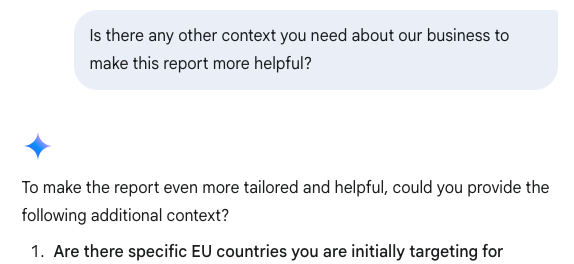
Lastly, if you want to be sure you didn’t miss anything, ask the Deep Research agent directly to get additional context from you:
As mentioned before, the default output (esp. of ChatGPT) is a bit of a mess. If you want something that is easier to digest, you’ll have to specify that.
Some things that have worked well for me include:
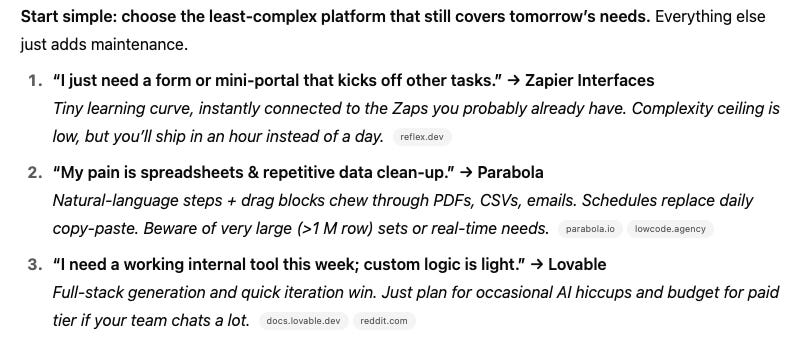
Being explicit about the content and structure of 1) the overall document and 2) individual sections made a massive difference for me.
For example:
-
Dictate any key things you want included in the deliverable (e.g. a specific comparison, templates, copy examples, code snippets etc.)
-
Ask the agent to follow the Pyramid Principle and lead with the key takeaways or recommendations (both in the main summary and in each individual sub-section)
-
Ask for an overview of the sources used, incl. what they were used for, their type (e.g. government vs. commercial vs. news outlet vs. newsletter / blog), the date they were created or updated etc.

Just adding a few basic instructions to the prompt makes a massive difference in how the report looks.

As you saw in the overview above, only Gemini reliably shares a research plan proactively. To prevent negative surprises, remember to ask for it before the agent kicks off any work.
For example, this is the proposed research plan I got from ChatGPT for a deep dive into vibe coding tools after explicitly asking for it.
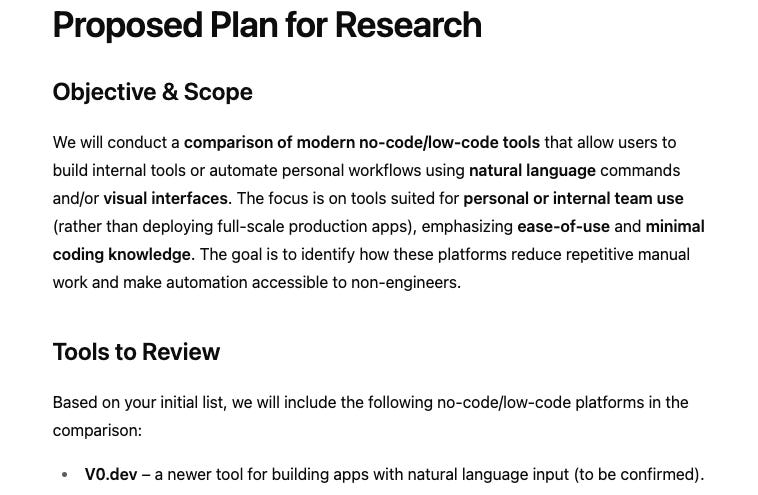
Here are the key things I’d watch out for:
-
Is the research plan comprehensive? Is there any analysis you want the agent to do, or a section you want them to write up, that’s missing?
-
Do you like where the agent is focusing? If you have a particular area you’re interested in, make sure the agent is building its report around that
-
Are there any implicit or explicit assumptions that you disagree with? If so, provide relevant context to plug those gaps
-
Do you agree with the methodology (e.g. evaluation or comparison criteria)?
This is also a good time to specify if you want the agent to prioritize certain sources.
For example, you could ask to use data from independent third parties rather than company websites, or that you want only data that’s more recent than a certain cut-off date.
If you have specific expectations (e.g. for what the output should look like), it can be helpful to give examples.
For example, you might be using Deep Research to automate the creation of reports you used to do manually. In that case, drop some best-in-class samples of your work into a document and upload it as context so that the AI agent can imitate them.
Here’s an example of an end-to-end prompt that incorporates the tips from above:

And here is what ChatGPT produced:
Pretty good, I’d say — and much better than what you would have gotten with a simple “create an account scoring guide” prompt.
Side note: As you can see, it promised to share a research plan before proceeding and then forgot about it. That’s why I recommend repeating the request when answering the context questions (which I didn’t do in this case).
You can either design prompts yourself or ask AI to help (either to feedback your draft prompt or write one from scratch).
For example, if you ask ChatGPT o3 this…

…you get back this.
Note: I recommend not just blindly copy-pasting the AI-generated prompt, but tweaking it to your purposes. For example, you can see that o3 included a lot of very specific asks, and these might not be exactly what you’re looking for.
Either way, it’s a good starting point and faster than creating a prompt from scratch.
Deep Research credits are limited, so crafting solid prompts is important. Still, I recommend to approach research with AI the same way you would with a human analyst.
There are several reasons why:
Can you describe what the perfect analysis of a topic looks like? Every little thing it needs to contain?
Probably not. But once you see one, you’ll immediately know how it could be improved. In my experience, you get a strong result much faster by getting a first version and providing feedback than by obsessing over the perfect prompt.
This is especially true if you’re not an expert in the area. I often know so little about a topic that I don’t even know what questions I should be asking. So instead, I do the following:
-
First, I ask for a high-level overview with suggestions for follow-up deep dives
-
Then, after reviewing the initial report, I go deep on the most interesting areas one-by-one
This way, I avoid being overwhelmed by a 50-page report full of information I either don’t understand or don’t need. And with each deep dive, I get a better understanding and am able to refine my questions for the next “research job”.
It’s the same as when you’re delegating work as a manager: You get some of the best deliverables when you give people some freedom in how they execute. For example, they might approach the problem from an angle you didn’t even consider.
If you give a super prescriptive research prompt, the best possible outcome is a report as good as what you would have created. But if you want to be positively surprised, you need to leave things a bit more open-ended.
Imagine you get an in-depth report for how to build an ML model for a certain use case, including checklists, timeline estimates, code examples etc., only to realize that you forgot to provide a crucial piece of context.
Not only is all of that stuff useless now; since the report is so detailed, you probably spent way too much time digging through it until you realized it was fundamentally flawed.
When it comes to complex topics, your initial focus should be on getting the core of the analysis right. Then, once you’re happy with it, you can ask the AI to create downstream deliverables like detailed project plans or anything else you need to actually implement the recommendations.
As discussed above, ChatGPT Deep Research reports can be long; really long. Sometimes up to 20k words and more.
I don’t recommend reading them end-to-end the moment you get them, though. Instead, I’d treat them as a resource you can selectively reference whenever you need to go deep on a particular aspect.
To get a quick overview of the key points, it’s more efficient to feed the report back into ChatGPT (or another tool) and ask for a summary. And if you’re doing the research as part of a cross-functional project at work, I highly recommend asking for multiple summaries tailored to specific audiences (e.g. the PM, the Finance team etc.).
Lastly, humans aren’t the only ones who can get value out of Deep Research. You can also add the reports as context to any future AI conversations or projects:

DeepResearch is an absolutely mind-blowing feature — if you know how to use it. Hopefully this guide provides a shortcut to maximizing the value you get from it.
Over the next weeks and months, I’ll publish more in-depth guides like this. Subscribe below to get them in your inbox.
But don’t worry: I’ll continue doing non-AI content as well, and I have some meaty posts in the pipeline. Stay tuned!
Ready for your next adventure? Here are some of my favorite open roles, brought to you by BizOps.careers (sorted from early to late stage):
Enterpret: Business Operations Manager | 🏠︎ Location: NY | 💼 Experience: 3+ YOE | 🚀 Stage: Series A | 🏛️ Investors: Sequoia, Kleiner Perkins
Pulley: Strategy & Operations Manager | 🏠︎ Location: Remote | 💰 Salary: $150k – $195k | 💼 Experience: 5+ YOE | 🚀 Stage: Series B | 🏛️ Investors: Founders Fund, General Catalyst
Alloy: Chief of Staff – Supporting CEO | 🏠︎ Location: NY | 💰 Salary: $225k – $260k | 💼 Experience: 6+ YOE | 🚀 Stage: Series C | 🏛️ Investors: Lightspeed, Bessemer
Decagon: Business Operations & Data Analytics | 🏠︎ Location: SF | 💰 Salary: $175k – $220k | 💼 Experience: 5+ YOE | 🚀 Stage: Series C | 🏛️ Investors: a16z, Accel, BOND
Decagon: Strategic Growth | 🏠︎ Location: SF | 💰 Salary: $200k – $280k | 💼 Experience: 3+ YOE | 🚀 Stage: Series C | 🏛️ Investors: a16z, Accel, BOND
Glean: Product Operations Lead | 🏠︎ Location: Palo Alto, CA | 💰 Salary: $185k – $235k | 💼 Experience: Flexible | 🚀 Stage: Series D+ | 🏛️ Investors: Sequoia, Kleiner Perkins, Lightspeed
Faire: Marketplace Strategy & Analytics Senior Associate | 🏠︎ Location: SF | 💰 Salary: $129k – $177k | 💼 Experience: 3+ YOE | 🚀 Stage: Series D+ | 🏛️ Investors: Sequoia, Lightspeed, Founders Fund
Perplexity: Finance Manager | 🏠︎ Location: SF | 💰 Salary: $180k – $230k | 💼 Experience: 5+ YOE | 🚀 Stage: Series D+ | 🏛️ Investors: IVP, NEA, Bessemer
Dropbox: Chief of Staff to the CEO | 🏠︎ Location: SF / Remote | 💰 Salary: $150k – $253k | 💼 Experience: 5+ YOE | 🚀 Stage: Public